Kenwood TM-D710A APRS – Getting Started
 I recently bought a Kenwood TM-D710A to use at the VHF/UHF radio here at the home QTH, I’m slowly dipping my toes in the APRS pond.
GEtting it to receive and display APRS packets was a no-brainer:
- Turn radio on.
- Tune the left side (‘A in 710 parlance) to 144.390.
- Push the TNC button a couple of times until ‘APRS12’ appears at the top of the display.
Today I decided to take the next step and see of I could get it to ‘beacon’. I configured the settings (NOTE: I do not claim these to be optimal settings. This is simply what I used initially that worked):
Basic Settings (Menu 600)
- My Callsign : WB7OBG
- Beacon Type : APRS
Position (Menu 605)
- Name: Home
- Lat/Lon : transcribed from a hand-held GPS (I do not have a GPS unit attached to the radio. It’s a base station)
Beacon Information (Menu 606)
- Speed: Off
- Altitude: Off
- Position Ambiguity: Off
Position Comment (Menu 607)
- In Service
Status Text (Menu 608)
- 1 Text: Home
- 1 TX Rate: 1/4
Station Icon (Menu 610)
- The little House symbol
Beacon TX Algorithm (Menu 611)
- Method: Auto
- Initial Interval: 10min
- Decay Algorithm: Off
- Proportional Pathing: Off
Verifying that it is Working
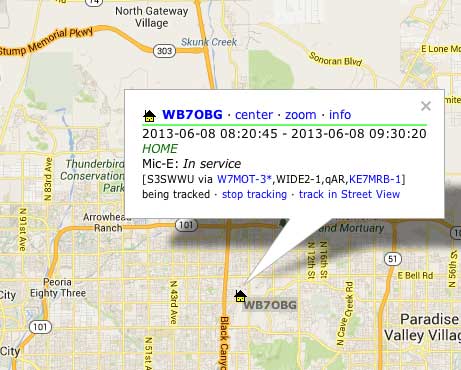
To verify that I was actually transmitting something intelligible, I went to:
and entered my callsign in the ‘Track Callsign’ field and clicked search. Shazam! There I was!